
What’s Volvo VIDA ?
Volvo VIDA is an essential software platform designed for the diagnostic and maintenance needs of Volvo vehicles. It stands for “Vehicle Information and Diagnostics for Aftersales.
Which OBD2 Interface for VIDA ?
- Volvo Dice(Full chips clone,SN 206751)
- Mongoose Pro
- SM PRO v2
- VXDIAG VCX Nano
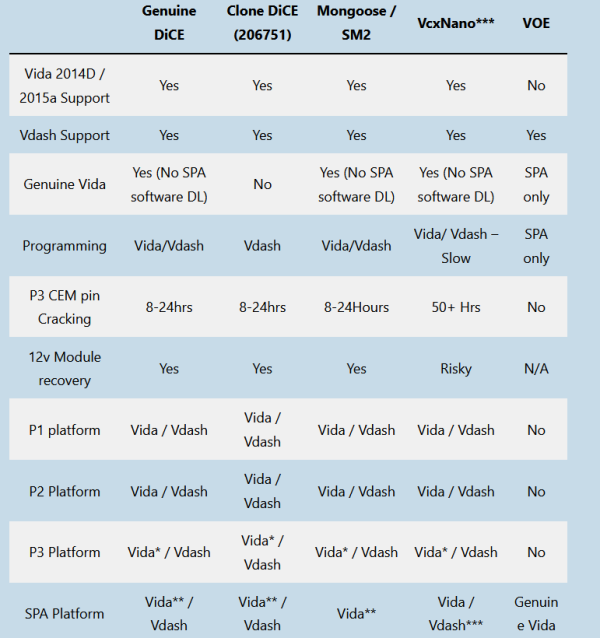
- Full chips Dice clone unit with M32C M30855FJGP processor will be the First option.it will full support Vida2014d/2015a and VDash software.
also no any problem on P80 platform and s/v40 classic . - Mongoose Pro is reliable , robust and easy to install, it supports all version of Vida has Vdash, it can quick code read on a car or programming with Vida / Vdash. It is supported by all flavors of VIDA and Vdash .99.9% the same as DiCE.
- Both SM2 pro J2534 and Mongoose Pro works well on P1, P2, P3 platform .(NOT P80 / S/V40 classic)
- Ethernet VOE cables are solely for use with the new SPA and CMA platform cars. They are not supported by VIDA 2014D or 2015A.
- For basic code reading with Vida2014d , Vxdiag VCX is fine, on P3 platform and newer cars ,VCXNano poor performance starts to show its weakness mostly due to its slowness. SPA platform cars, forget about it.I personally would never entertain any module programming with Vxdiag. There will big risky on bricked CEM,ECU modules
how to scan 2017/2018 year Volvo with 2014D Vida ?
Shortly ,You need replace the SQL files which been modified .use it at your own risk .Some engines variants are not listed, some ECU’s are not compatible, some decoding doesn’t automatically populate the engine or lhd/rhd but choosing something close enough will get you your fault codes and most calibration routines.
- Download the modified SQL files
- Unzip the files to a folder somewhere easy to access (Such as your desktop)
- Stop Vida With Vida monitor (By the clock, Right click it, then choose stop)
- Stop the VIDA SQL service (Windows key + R and type “services.msc” and click ok, now scroll down to SQL Server (Vida) and right click and choose stop)
- now navigate to C:\Vida\db and take a copy of BaseData_Data.mdf and BaseData_log, AccessServer.mdf , AccessServer.log and put them somewhere safe just in case.
- Now back to where we extracted the new SQL files and copy them to C:\Vida\db , it should ask to over write the existing files, Say yes to overwrite them.
- Start the Vida SQL service
- Start Vida with Vida Monitor
- You will need to Repatch Vida afterwards to fix license expired error.
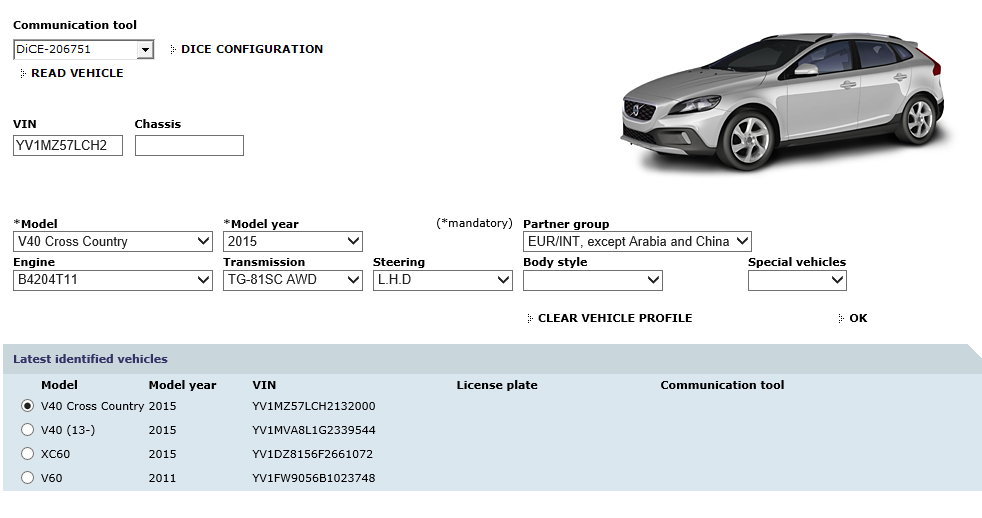
Example this VIN (YV1MZ57LCH2) is 2017 Volvo V40 Cross country ,now it listed on VIDA software as 2015 Year. You can also add others newers P3 models VIN to database.
Leave A Comment