
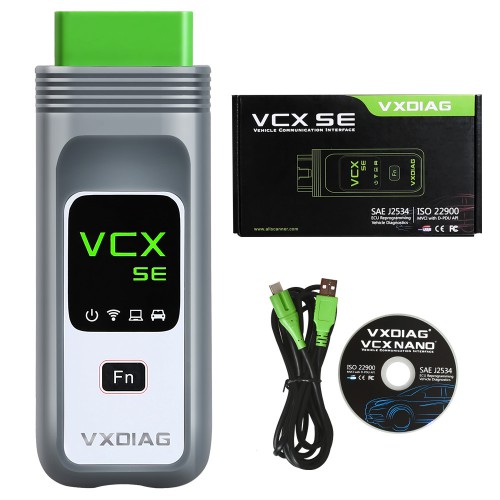

VXDIAG VCX SE BMW is Diagnostic Interface for BMW vehicles ,which compatible ISTA+ and others Engineer software.
VXDIAG VCX SE BMW Diagnostic Tool Supports ECU Programming Online Coding
$89.00 – $169.00
Description
VXDIAG VCX SE BMW diagnostic tool is one OEM dealer tool for BMW ,Rolls- Royce and Mini Cooper.
VCX SE BMW compatible with ISTA-D and ISTA-P ,that perform same functions as BMW ICOM Next and ICOM A2 for diagnostic and programming .
Please Note :2 Kinds of VCX SE BMW Interface ,one for BMW License only ,another able open others Vehicle License .
2TB Software Hard disk installed BMW, BENZ, GM, Ford / Mazda, Toyota, Honda, VW, LandRover / Jaguar, Subaru, Volvo, VW Software.
If you do not have software ,add the 2TB Softwares SSD to Cart together.
VXDIAG VCX SE BMW Software included
- ISTA-D 4.27.13 ,ISTA-P 3.67.100.
- BMW Group ISPI
- E-SYS
- WINKFP
- Tool32
- INPA
- KSD2
- NCS-Expert tool
VCX SE BMW Tool Personalized Customization:
- Set Seat Belt Alarm time (second/sec)
- Disable passenger Seat Belt Alarm
- Disable driver Seat Belt Alarm
- Set the engine on/off status the same as that before the ignition off or the default status off.
- Set the central lock automatically unlock when ignition off
- Set Fuel Economy Mode as default mode after ignition on
- Enable roll up window when open car door
- Enable the option of DRL (Day Running Lights) on or off.
- Set Highlight auxiliary and intersection traffic light “Automatic”
- Enable to adjust DRL brightness (the default factory setting is brightest)
- Set fog light turn on while headlight is on
- Enable to Lock/Unlock sound and adjust the volume
- Enable auto close sunroof when raining (May lead to initialize sunroof, it will work only after ignition on for 10 seconds, not very effective.)
- Set windshield wiper Back in place when ignition off
- Set sunroof automatically close in a tilted state (It needs to initialize sunroof)
- Set the turn signal light on/off times (F30)
- Enable CIC menu display CI version
- Three Bluetooth phone rings available
- Enlarge phone number and text storage (25 to 50)
- A/C (Automatic Air Conditioning)
- Set indoor internal circulation memory the same as that when the ignition off last time.
- Set air conditioning memory the same as that when ignition off last time.
- Display engine output power and torque on navigation screen
- Cancel home screen boot delay confirm message
- Cancel rear view camera statement when reversing
- Display available gas station on navigation
- Display speed limit info (Need hardware support)
- Display engine torque menu
- Auto headlight
- TPMS
- Display tire pressure and temperature (Need hardware support)
- Adjust mile to kilometer
- GPS time synchronization
- Dashboard stimulate instant fuel consumption: change from 20 to 30
- Enable dashboard light on always
- Enable dashboard light always on at night (For For BMW 535, GT, 7 series and part of For BMW 530)
- Enable dashboard light always on at daytime (For For BMW 535, GT, 7 series and part of For BMW 530)
- Enable dashboard lights turn grey (For For BMW 535, GT, 7 series and part of For BMW 530)
- Enable dashboard lights turn orange or grey (For For BMW 535, GT, 7 series and part of For BMW 530)
- DS Mode display current shift from S1 to S7
- Set Head-Up Display (Navigation map distance and turn signal, etc.) (Need hardware support)
- PDC reversing radar is changed vertically and horizontally


Reviews
There are no reviews yet.