
How to make Clone VCM2 work for Suzuki Vehicle?
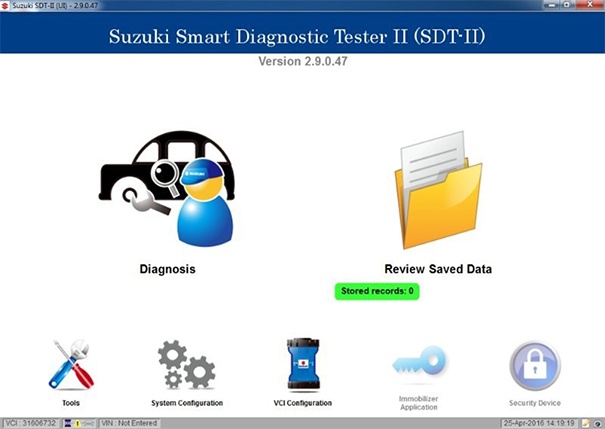
SDT2 work with VCM2 Keywords:
- Good VCM2 interface that double board and able downgrade firmware
- SUZUKI SDT2 V2.28 or V2.29 ,newest SDT2 wont work ,Download Suzuki SDT-II 2.29.00.04 + base 05.04.21
- Older version VCM2 manager ( v2.1.1.5 or 2.1.119.3), Download VCI manager 2.1.119
SDT2 with VCM2 software and driver Installation Steps:
- Step 1: Install SDT II
- Step 2: Install Ford VCM 2 Manager
- Step 3: Navigate to either C:\Program Files (x86)\Bosch\VTX-VCI\ or C:\Program Files\Bosch\VTX-VCI\
- Step 4: Open the “VCI Software (Ford-VCM-II)” folder and copy its contents
- Step 5: Paste the files from the Ford folder into the “VCI Software (6516-Suzuki)” folder
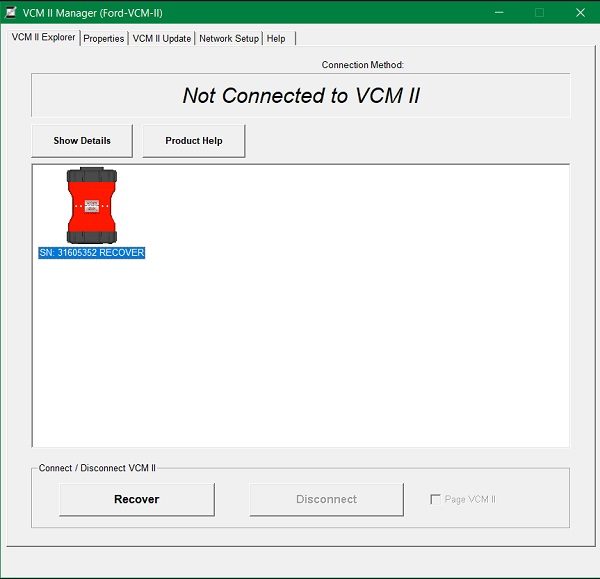
- Step6:Press Reset button on VCM2 VCI and go Recover mode ,Downgrade/update firmware to match VCI Manager .
Reviews 1:
This is how I made it work with the Suzuki sdt2 software.
If you have problem install SDT2 ask configure VCI,You can isntall IDS V86 first or kill the task setup vci
The SDT2 diagnostic software only works on the latest Suzuki model vehicles (see application list).You can download last version V2021.03 Suzuki SDT-II 2.28.01.30 . The SDT2 can be used for pass through reprogramming of modules on most Suzuki vehicles when combined with the SEPS software.
SEPS software is not included with this kit. Note: The SDT2 does not have immobilizer capabilities.
I used the high quality FORD VCMII clone from china….but not tested on others ordinary Clone VCM. as some friends on Forum says it will not working out.
Or You can buy one VNCI 6516SZ SUZUKI TOOL Directly if you don’t have VCM2 Interface.
I installed the FORD IDS V86 (VCM2 Manager v2.1.1.5 or 2.1.119.3)on the clean install windows 7 32 bit professional ,after then open the Bosch VCI manager and downgrader the VCM II to older firmware to match with SUZUKI SDT2 .
I installed Suzuki sdt2 software, and when the install asked me to connect the VCMII i connected the FORD VCM II and continued with the install.
Once it finished I opened the BOSCH folder, then VTX-VCI sub folder, and copied the entire contents of the VCI Software (Ford-VCM-II) to VCI Software (6516-Suzuki). Replace all files !!!
the suzuki software will see the VCMII as the OEM VCM even that the VCI manager say its a FORD VCMII.
The regedit will look into the folder VCI Software (6516-Suzuki) for all the drivers, and it will load the FORD drivers to make it work.
DONE.
Remember to open VCI manager and connect the VCM before you go into the suzuki or ford software.
I hope this helps !!
Reviews 2:
I confirm that the ford VCMII works perfectly with suzuki DST2 software.
I connected a 2015 Suzuki car non USA model and worked perfectly.
I also connected other USA model cars and worked OK.
I tried on suzuki swift 2001 g10a ,suzuki wagon R 1.3 2007′,and suzuki swift diesel 1.3 2011,ALL WORKED FINE
Reviews 3:
Works well on all new cars, had some troubles with older cars:
Suzuki alto 2009 > no airbag diagnostic
Suzuki swift 2005 > no engine diagnostics
Suzuki sx4 2006 > no engine diagnostics
Reviews 4:
Ive managed to scan my dad’s suzuki swift (2009 also the 1.5l petrol) and my suzuki vitara (2016) with it
My
VC II only works with version 2.26.3.5. With version 2.28.01.30 the VCI
is not recognized. Where could the mistake be? Greetings Klaus
May Your Suzuki VCM2 firmware need upgrade to v2.28
First try update Firmware .if not able update then means your VCI not good enough
hello dear friend i want suzuki sdt2 crack software will
You can download SUZUKI SDT2 software here ,after replace files to make VCM2 Interface work on Suzuki SDT2 Software
https://mega.nz/folder/uxdkQRqI#_MY970aFNzgi_cbryb6Wtw
Yess It worked for me too. In case something is wrong, then run the FORD VCI manager as ADMIN and press USB Repair button. Then sould work for you again.